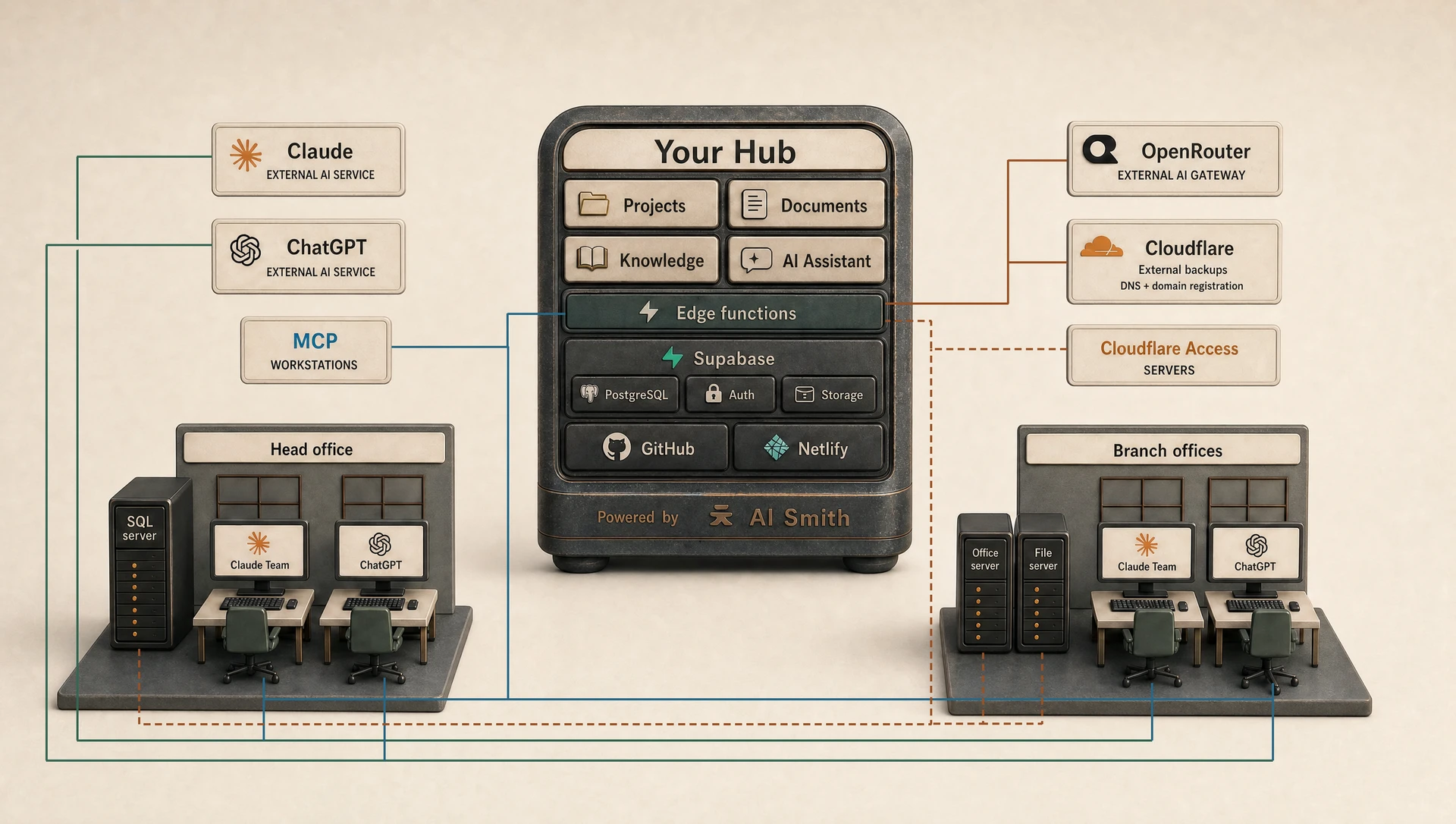
Your Hub
Your work, in one place.
Keep projects, documents and useful company knowledge together. Give your assistant a brief, review its draft, and save or export the result for your team.
For example
Prepare a proposal using an approved company description and the client's brief, then review it before sharing.
What to know
Putting documents in different projects does not by itself make them private to those projects. Access depends on the Hub's permissions and shared-reference settings.
Technical details
Available actions
- Create projects and objectives, generate a draft and retain the result against its objective.
- Upload documents, maintain organisation and personal context, and curate reusable shared knowledge.
- Export generated prose to Word or PDF and supported tables to Excel or CSV.
The browser application uses Supabase for identity, records and file storage. Edge functions carry out server-side actions, including model requests through OpenRouter.
Generation reads context through the caller’s database client. Searchable documents and organisation-wide library material can contribute across projects; a project is not automatically an isolated document collection.